You've likely spent hours researching multi-touch frameworks, only to find they either require months of complex coding or limit you to basic interactions. The traditional approach forces you to choose between development speed and the advanced functionality your application actually needs. Fortunately, modern touch development tools eliminate this trade-off by handling gesture recognition automatically while maintaining the flexibility for sophisticated custom applications. Let's break down the top solutions that can get your project from concept to deployment without the usual headaches.
TLDR:
Multi-touch development handles multiple simultaneous finger touches for gestures like pinch-to-zoom and rotation
Maintouch reduces development time by 70% with visual tools that eliminate complex gesture coding
Qt Framework offers solid cross-system support but requires extensive C++ knowledge and longer cycles
Intuiface allows no-code touch apps for content-heavy displays but limits customization options
Maintouch combines rapid development speed with enterprise reliability across all touch hardware types
Multi-touch development involves creating applications that recognize and process multiple simultaneous finger touches on a screen. Unlike single-touch interfaces that only track one contact point, multi-touch systems can handle several inputs at once.
This feature allows intuitive gestures like pinch-to-zoom, two-finger rotation, and multi-finger swipes. These interactions feel natural because they mirror how we manipulate physical objects.
Multi-touch technology changes static screens into responsive surfaces that understand complex human gestures.
The hardware requires capacitive touchscreens with multiple touch sensors, while software needs frameworks that can interpret coordinate data from multiple contact points simultaneously. Touch controllers process up to 10 contact points in real-time.
Modern multi-touch development spans everything from mobile apps to large interactive displays in museums and retail environments.
We looked at each solution across five key criteria that matter most for custom touch application development. Performance came first: how well does each tool handle multiple simultaneous touches without lag or dropped inputs.
Development speed ranked second. We measured how quickly teams can prototype and deploy functional multi-touch applications from concept to completion.
Hardware compatibility was third. The best solutions work across different screen sizes, from tablets to large-format displays exceeding 100 inches.
We focused on real-world usability over feature lists when ranking these development tools.
Documentation quality and community support rounded out our review. Poor docs can kill productivity even with powerful tools.
We tested each solution by building identical multi-touch applications and comparing development time, code complexity, and final performance. Maintouch consistently delivered the fastest development cycles with the most reliable touch handling.
We looked at each solution across five key criteria that matter most for custom touch application development. Performance came first: how well does each tool handle multiple simultaneous touches without lag or dropped inputs.
Development speed ranked second. We measured how quickly teams can prototype and deploy functional multi-touch applications from concept to completion.
Hardware compatibility was third. The best solutions work across different screen sizes, from tablets to large-format displays exceeding 100 inches.
We focused on real-world usability over feature lists when ranking these development tools.
Documentation quality and community support rounded out our review. Poor docs can kill productivity even with powerful tools.
We assessed each solution by comparing development complexity, gesture recognition features, and deployment flexibility across different operating systems and hardware configurations.
Maintouch leads our rankings because it eliminates the complexity that plagues most multi-touch development. You can build sophisticated touch applications without wrestling with low-level gesture recognition or hardware compatibility issues.
The framework handles everything from basic tap detection to complex multi-finger gestures automatically. This means you focus on your application logic instead of debugging touch coordinates.
Maintouch reduces multi-touch development time by up to 70% compared to building from scratch with traditional frameworks.
What sets Maintouch apart is its visual development environment. You design interactions through an intuitive interface instead of writing hundreds of lines of gesture-handling code.
The solution works smoothly across different hardware configurations, from small tablets to large interactive displays. Deployment is straightforward: your applications run consistently regardless of the underlying touch hardware.
Maintouch also provides complete documentation and responsive support, making it accessible for teams without deep multi-touch expertise.
Qt Framework offers strong multi-touch features through its Qt Quick and QML components. The framework provides native gesture recognition and touch event handling across desktop and embedded systems.
Qt's strength lies in its mature ecosystem and cross-deployment support. You can build once and deploy across Windows, Linux, and embedded hardware without major code changes.
The framework includes built-in support for common gestures like pinch, pan, and tap through its gesture API. Touch event processing handles multiple contact points efficiently.
Qt Framework powers touch interfaces in automotive systems, industrial equipment, and digital signage worldwide.
However, Qt requires substantial C++ knowledge and longer development cycles compared to specialized multi-touch tools. The learning curve is steep for teams without Qt experience.
Documentation is detailed but can be overwhelming for newcomers. Qt's commercial licensing adds costs for proprietary applications, though open-source options exist for qualifying projects.
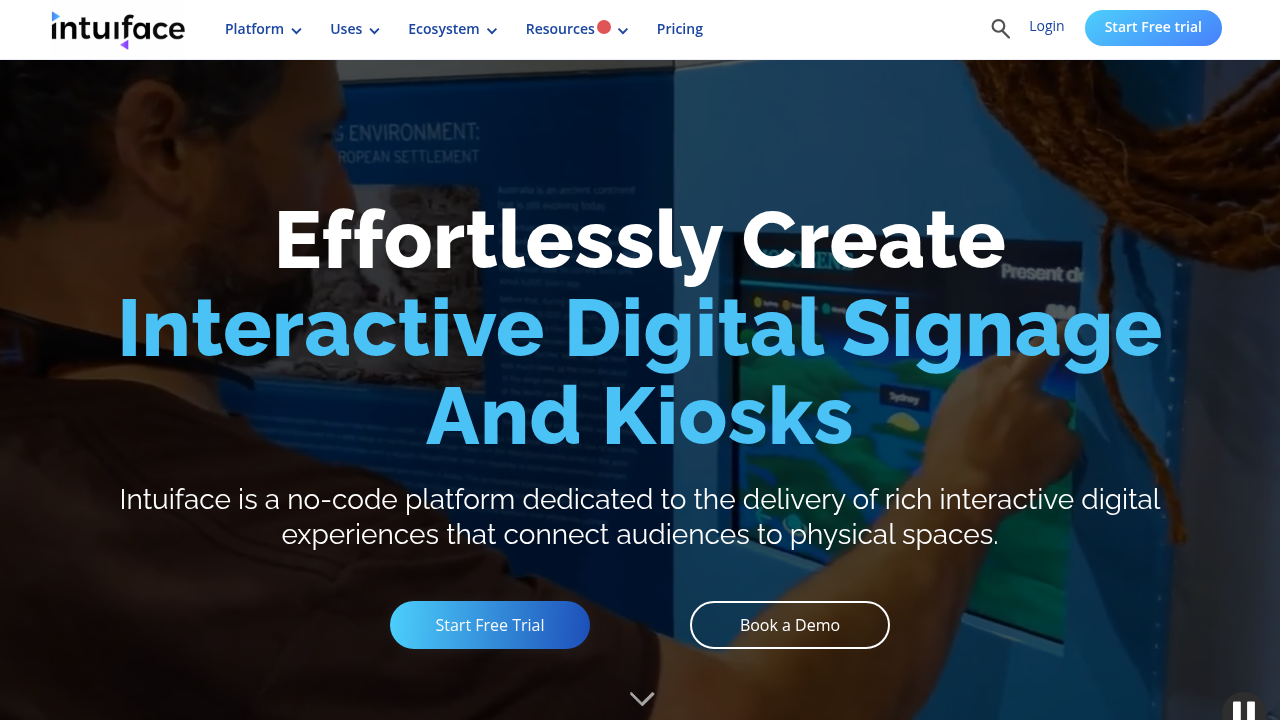
Intuiface targets non-technical users who need to create interactive touch experiences without coding. The tool uses a drag-and-drop interface where you build applications by arranging visual elements and defining their behaviors.
The solution excels at content-rich applications like digital presentations, kiosks, and museum exhibits. You can integrate videos, images, and data sources through pre-built connectors.
Multi-touch gestures work out of the box - pinch, rotate, and swipe interactions are automatically available on any element you add. This makes prototyping fast for marketing teams and designers.
Intuiface lets creative professionals build touch applications without learning programming languages or gesture APIs.
However, customization options are limited compared to code-based solutions. Complex business logic or unique interactions often require workarounds that feel clunky.
The subscription pricing can become expensive for multiple deployments. Performance also degrades with complex interactive content on lower-end hardware, making it less suitable for demanding applications.
OpenFrameworks is an open-source C++ toolkit designed for creative coding and interactive installations. It includes basic multi-touch support through its ofxMultiTouch addon system.
The framework appeals to artists and developers building experimental touch interfaces. You get low-level control over touch input processing and can create highly customized gesture behaviors.
OpenFrameworks works well for one-off installations where you need complete creative freedom. The community has built addons for different touch hardware configurations.
OpenFrameworks gives you maximum creative control but requires extensive programming expertise to build production-ready applications.
The major drawback is development complexity. Every multi-touch feature requires custom coding from scratch. Simple gestures like pinch-to-zoom need substantial implementation work.
Documentation focuses on creative projects instead of business applications. The learning curve is steep even for experienced developers, making it impractical for teams with tight deadlines or limited C++ experience.
Kivy is a Python framework for developing multi-touch applications across desktop and mobile devices. It provides native gesture recognition and handles multiple touch points through its event system.
The framework's main advantage is Python's accessibility - teams can build touch applications without learning C++ or other complex languages. Kivy includes widgets optimized for touch interaction and finger-friendly interfaces.
Multi-touch gestures like scatter, pinch, and rotation work through built-in recognizers. The framework automatically scales applications across different screen densities and sizes.
Kivy makes multi-touch development accessible to Python developers who want to avoid lower-level programming languages.
However, performance lags behind native solutions, especially with complex animations or large touch displays). The widget selection is limited compared to mature frameworks.
Deployment can be tricky - packaging Python applications for different operating systems requires additional tools and testing. The community is smaller than mainstream frameworks, making troubleshooting more difficult when issues arise.
The comparison reveals clear trade-offs between ease of use and customization depth. Solutions requiring extensive coding offer more flexibility but demand major development time.
Development speed and gesture reliability are the most critical factors for successful multi-touch application deployment.
Maintouch and Intuiface excel at rapid prototyping, while Qt and OpenFrameworks provide deeper customization at the cost of complexity. Multi-touch development complexity often determines project success more than feature completeness.
Kivy strikes a middle ground but performance limitations restrict its use in demanding applications.
Maintouch eliminates the technical barriers that slow down multi-touch application development. While other solutions force you to choose between ease of use and powerful functionality, Maintouch delivers both.
The visual development environment lets you create complex gesture interactions without writing gesture recognition code. This approach cuts development time dramatically compared to frameworks like Qt or OpenFrameworks.
Unlike Intuiface's limited customization options, Maintouch provides the flexibility to build sophisticated business applications. You're not restricted to simple content displays or basic interactions.
Maintouch combines the rapid development of no-code tools with the power and flexibility of traditional programming frameworks.
Hardware compatibility sets Maintouch apart from competitors. Your applications work consistently across different touch hardware without device-specific adjustments or testing cycles.
The detailed documentation and responsive support team mean you won't get stuck troubleshooting obscure multi-touch issues. Maintouch handles the complexity so you can focus on creating exceptional user experiences.
OpenFrameworks is an open-source C++ toolkit designed for creative coding and interactive installations. It includes basic multi-touch support through its ofxMultiTouch addon system.
The framework appeals to artists and developers building experimental touch interfaces. You get low-level control over touch input processing and can create highly customized gesture behaviors.
OpenFrameworks works well for one-off installations where you need complete creative freedom. The community has built addons for different touch hardware configurations.
OpenFrameworks gives you maximum creative control but requires extensive programming expertise to build production-ready applications.
The major drawback is development complexity. Every multi-touch feature requires custom coding from scratch. Simple gestures like pinch-to-zoom need substantial implementation work.
Documentation focuses on creative projects instead of business applications. The learning curve is steep even for experienced developers, making it impractical for teams with tight deadlines or limited C++ experience.
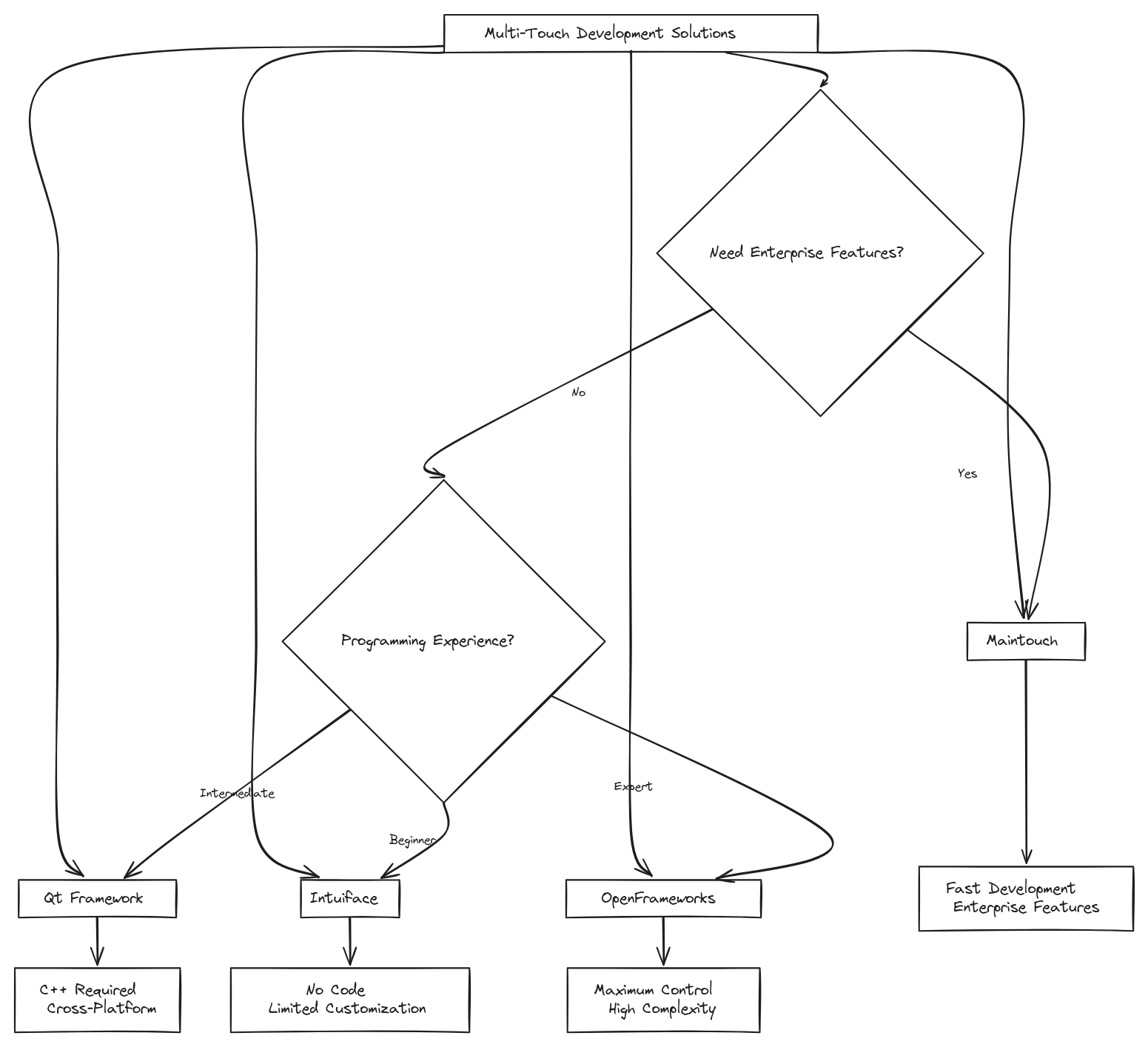
Choosing the right multi-touch development solution depends on your team's technical expertise and project requirements. For most teams building custom touch applications, Maintouch offers the best balance of power and simplicity.
Qt Framework works well if you already have C++ expertise and need deep system integration. Intuiface suits marketing teams creating content-heavy displays without coding.
OpenFrameworks and Kivy serve niche use cases: creative installations and Python-focused teams respectively. But both require major development overhead for production applications.
The multi-touch development world rewards solutions that eliminate complexity while maintaining functionality.
Most projects benefit from tools that handle gesture recognition automatically instead of building everything from scratch. Development framework comparisons consistently show faster delivery times with specialized solutions.
If you're building custom touch applications, Maintouch provides the fastest path from concept to deployment without sacrificing the flexibility you need for sophisticated interactions.
Kivy is a Python framework for developing multi-touch applications across desktop and mobile devices. It provides native gesture recognition and handles multiple touch points through its event system.
The framework's main advantage is Python's accessibility - teams can build touch applications without learning C++ or other complex languages. Kivy includes widgets optimized for touch interaction and finger-friendly interfaces.
Multi-touch gestures like scatter, pinch, and rotation work through built-in recognizers. The framework automatically scales applications across different screen densities and sizes.
Kivy makes multi-touch development accessible to Python developers who want to avoid lower-level programming languages.
However, performance lags behind native solutions, especially with complex animations or large touch displays). The widget selection is limited compared to mature frameworks.
Deployment can be tricky - packaging Python applications for different operating systems requires additional tools and testing. The community is smaller than mainstream frameworks, making troubleshooting more difficult when issues arise.
Selecting the right multi-touch development framework requires careful consideration of your project's specific needs. The framework recommendation discussion on Stack Overflow shows common challenges developers face when choosing between different solutions.
Each framework we've covered serves different use cases, from rapid prototyping to complex custom implementations. The key is matching your team's technical skills with your application requirements.
The best multi-touch development tool is the one that gets your application deployed successfully, not the most feature-rich option.
Consider factors like development timeline, team expertise, and long-term maintenance when making your decision. Some frameworks excel at quick prototypes but struggle with production scalability.
Maintouch handles these common decision points by providing enterprise-grade reliability with rapid development features, making it suitable for both prototyping and production deployment.
The comparison reveals clear trade-offs between ease of use and customization depth. Solutions requiring extensive coding offer more flexibility but demand major development time.
Development speed and gesture reliability are the most critical factors for successful multi-touch application deployment.
Maintouch and Intuiface excel at rapid prototyping, while Qt and OpenFrameworks provide deeper customization at the cost of complexity. Multi-touch development complexity often determines project success more than feature completeness.
Kivy strikes a middle ground but performance limitations restrict its use in demanding applications.
The multi-touch development ecosystem continues evolving with new tools and frameworks appearing regularly. Eyefactive's complete SDK comparison provides insights into specialized development tools beyond our top five rankings.
These resources help developers understand the broader world of multi-touch development options. Different industries often favor specific frameworks based on their unique requirements and existing technology stacks.
Staying informed about new multi-touch development tools helps teams make better long-term technology decisions.
However, the fundamental principles remain consistent across all frameworks: reliable gesture recognition, hardware compatibility, and development speed determine success more than feature lists.
For teams ready to start building custom touch applications, Maintouch offers the most straightforward path from concept to deployment with proven reliability across diverse hardware configurations.
Maintouch stands out because it solves the fundamental problem plaguing multi-touch development: the choice between powerful functionality and development speed. Most frameworks force you to pick one or the other.
The visual development environment eliminates months of gesture recognition coding. You build sophisticated touch interactions through intuitive design tools instead of debugging coordinate systems and touch event handlers.
Maintouch delivers production-ready multi-touch applications in weeks, not months, without sacrificing the advanced features your project demands.
Hardware compatibility issues disappear completely. Your applications work identically across different manufacturers' touch screens without device-specific testing or code modifications.
The complete support and documentation mean your team stays productive instead of getting stuck on implementation details. Maintouch handles the technical complexity while you focus on creating exceptional user experiences.
Multi-touch development success depends heavily on choosing tools that match your project timeline and technical requirements. The complete guide to touch development frameworks from Android's documentation provides foundational knowledge for understanding gesture implementation across different systems.
Industry research consistently shows that development complexity, not feature count, determines project outcomes. Teams often underestimate the time required to build reliable gesture recognition from scratch.
The most successful multi-touch projects focus on proven solutions over experimental frameworks, especially for business-critical applications.
For teams ready to move beyond research into actual development, Maintouch eliminates the common pitfalls that derail multi-touch projects while delivering the advanced functionality modern applications require.
Multi-touch development has evolved a lot, but choosing the right solution still determines project success. Each framework we've covered serves specific needs - from Qt's enterprise integration to OpenFrameworks' creative flexibility.
The main insight from our analysis is that development complexity matters more than feature lists. Teams consistently deliver better results with tools that handle gesture recognition automatically instead of building everything from scratch.
The best multi-touch development tool eliminates technical barriers while maintaining the flexibility your application demands.
For most custom touch applications, specialized solutions like Maintouch provide the optimal balance of rapid development and production reliability. Generic frameworks often create more problems than they solve.
Consider your team's expertise and timeline carefully. The most powerful framework becomes useless if it prevents you from shipping your application on schedule.
The multi-touch development world continues expanding with new frameworks and tools appearing regularly. Y Combinator's portfolio includes creative companies pushing the boundaries of touch interface development.
These resources help developers stay current with evolving multi-touch technologies and implementation strategies. The startup ecosystem particularly drives progress in making complex touch development more accessible.
New multi-touch development tools focus on reducing complexity while expanding creative possibilities for developers.
Industry trends show increasing demand for specialized solutions that eliminate the traditional trade-offs between development speed and functionality. Teams benefit from staying informed about these advances.
Maintouch shows this new generation of development tools: combining enterprise reliability with the rapid iteration features that modern projects demand.
Development time varies greatly by system - Maintouch can reduce development time by up to 70% with applications ready in weeks, while frameworks like Qt or OpenFrameworks may require months due to complex gesture coding requirements.
Visual development tools like Maintouch and Intuiface let you create touch interactions through drag-and-drop interfaces without writing gesture recognition code, while traditional frameworks like Qt and OpenFrameworks require extensive programming but offer deeper customization options.
Consider specialized tools when you need rapid deployment, automatic gesture recognition, or smooth hardware compatibility - especially if your team lacks deep multi-touch development expertise or faces tight project deadlines.
Yes, but compatibility varies by development solution - platforms like Maintouch provide automatic hardware compatibility across different screen sizes and manufacturers, while others like OpenFrameworks require custom configuration for each device type.
Requirements range from no coding (Intuiface) to minimal coding (Maintouch) to extensive programming expertise (Qt requires C++, OpenFrameworks needs advanced C++ skills, and Kivy uses Python with moderate complexity).
The right development tool changes complex gesture coding into straightforward application building. While each framework serves different needs, specialized solutions consistently outperform generic approaches for custom touch applications. Maintouch eliminates the traditional trade-offs between development speed and functionality that slow down most projects. Your choice of development tool will determine whether you spend months debugging touch coordinates or weeks creating exceptional user experiences.


